|
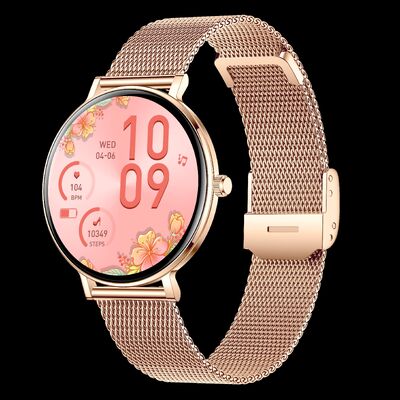
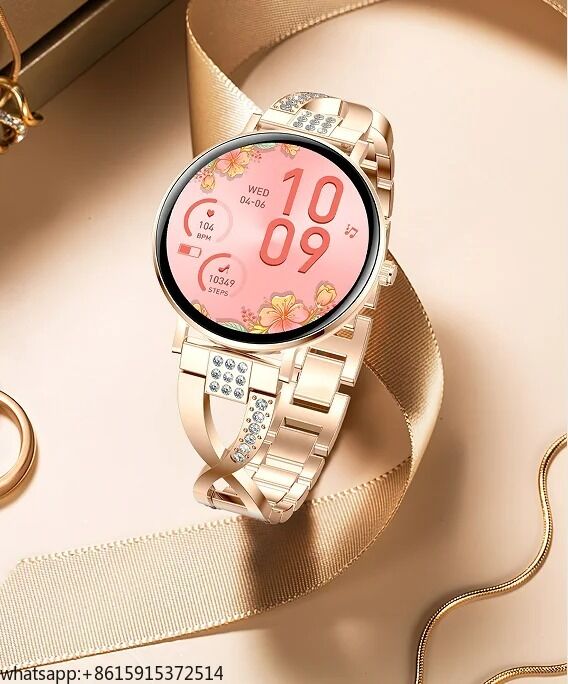
| Marchio: | Rainbuvvy |
| Numero di modello: | I232 |
| MOQ: | 100 pezzi |
| Prezzo: | USD 28 /PC |
| Condizioni di pagamento: | L/C, D/A, D/P, T/T, Western Union |
| Capacità di approvvigionamento: | 100 pezzi per 5 giorni |
| Specifiche I232 | ||
| Categoria hardware | descrivere | |
| Chip principale | RTL8763EWE | |
| FLASH | 128M | |
| BT | BLE5.0/BT5.3 | |
| Accelerometro | STK8321 | |
| display | AMOLED da 1,32 pollici, risoluzione 466 * 466 | |
| Touch | Full touch COF, IC touch: Hai Li Chuang CST820 | |
| Pulsanti fisici | Supporto (1 pulsante) | |
| Altoparlante | Supporto (impedenza 8 ohm, massimo 1W MAX) | |
| MIC (microfono) | Supporto (sensibilità 42DB+/-3DB) | |
| Motore | Supporto (intervallo di tensione 1,3V-2,8V, tensione di avviamento 1,3V MAX, tensione nominale: 1,8V) | |
| Torcia | supporto | |
| Frequenza cardiaca | Tianyi Hexin 3602 | |
| Batteria | Tensione nominale 3,8V, tensione di interruzione di carica 4,25V, 200mA | |
| Gestione della carica | Valore tipico della corrente di carica 120mA | |
| Specifiche del caricabatterie | 5V (corrente ≥ 0,5A) tensione di tenuta massima in ingresso 6,5V | |
| Funzionalità | Dettagli della funzione | Descrizione |
| Nome BT | Nome BT | Il braccialetto collegato mostra il nome BT, non più di 17 caratteri |
| Avvio | Pulsante acceso | Tenere premuto il pulsante laterale dell'orologio per accendere |
| Animazione di avvio | Mostra animazione di avvio (HELLO) | |
| Spegnimento | Spegnimento attivo | Tenere premuto il tasto laterale dell'orologio - Operazione di sistema - Spegnimento |
| Impostazioni-Azioni di sistema-Spegnimento | ||
| Spegnimento a basso consumo | Spegnimento automatico quando la potenza è troppo bassa | |
| Animazione di spegnimento | Mostra animazione di avvio (GOODBYE) | |
| Riavvio | Dispositivo (riavvio software) | Supporta il controllo del dispositivo per il riavvio attivo |
| "Orologio schermo" | "Orologio schermo" | "Orologio schermo": orologio digitale e orologio a lancette; solo gli schermi AM supportano l'attivazione |
| Associazione | Connessione tramite codice QR | Supporta il download del codice QR dell'applicazione e il codice QR del dispositivo di associazione |
| Scansione BT e Associazione | Fare clic sul nome BT corrispondente nell'elenco di scansione BT per associarlo | |
| Non associato | Reset (Reset di fabbrica) | Disassociazione avviata dal dispositivo, riavviare l'orologio dopo il ripristino alle impostazioni di fabbrica Tutti i dati vengono cancellati (esclusi quadranti push, sport push, game push) |
| Disassociazione | La disassociazione viene avviata dall'App, e il dispositivo continua a inviare segnali BT. Il dispositivo può essere nuovamente associato tramite scansione BT. Se non è possibile associarlo, andare nelle impostazioni del telefono cellulare dove l'orologio è stato associato l'ultima volta per cancellare la connessione e riconnettersi | |
| Connetti | Riconnessione automatica | Un dispositivo può essere associato a un solo telefono |
| Sincronizzazione dati | Sincronizzazione attiva | L'utente sincronizza attivamente i dati dall'app |
| Aggiornamento OTA | Aggiornamento proattivo | Aggiorna il firmware (quando la carica del braccialetto è inferiore al 30%, l'APP non supporta l'aggiornamento e le operazioni correlate al push (Nota: se si utilizza lo strumento di aggiornamento originale, non ci sono restrizioni)) |
| Gesti | Alza il polso per illuminare lo schermo e abbassa il polso per chiudere lo schermo | Lo schermo si illuminerà automaticamente quando alzi il polso, e lo schermo si spegnerà automaticamente quando lo abbassi. Puoi impostare se accendere/spegnere lo schermo quando alzi il polso sull'APP |
| Elettricità | Misuratore di potenza | La carica della batteria è visualizzata in 10 parti uguali, e la percentuale di carica non viene visualizzata |
| Definizione interazione tasto | Un tasto | Definizione funzione versione pubblica Tuobu: 1 pulsante: Breve pressione sul quadrante della pagina principale per accedere allo stile del menu, doppio clic sull'interfaccia dello stile del menu per cambiare stile, breve pressione su altre pagine per tornare alla pagina principale e pressione prolungata per visualizzare la pagina di spegnimento. La pressione prolungata in stato di spegnimento può avviare; |
| Interazione schermo | Tocco | Scorrere verso l'alto, verso il basso, verso destra, verso sinistra, pressione prolungata, clic |
| Scorrimento verso l'alto | Sul quadrante principale, scorrere verso l'alto per accedere alla funzione messaggi | |
| Scorrimento verso il basso | Sul quadrante principale, scorrere verso il basso per accedere alla funzione menu di scelta rapida | |
| Scorrimento verso sinistra | Barra laterale | |
| Scorrimento verso destra | Sul quadrante principale, scorrere verso destra per accedere alla funzione menu di primo livello (dati giornalieri, frequenza cardiaca, sonno, meteo, musica, esercizio, ossigeno nel sangue) | |
| Pressione prolungata sul quadrante principale | Tenere premuto il quadrante principale per accedere alla miniatura del quadrante e scorrere a sinistra e a destra per cambiare quadrante. Breve pressione sullo schermo per selezionare il quadrante da cambiare | |
| Multilingue | Lingua orologio | La lingua del firmware del prodotto è opzionale in base alla dimensione della flash: inglese, tedesco, francese, italiano, spagnolo, polacco, russo, portoghese, vietnamita, arabo, ebraico, tailandese, croato, turco, ceco, olandese, indonesiano, malese, finlandese, greco, rumeno, hindi, persiano (risoluzione 466*466, 410*502 non supporta cinese tradizionale, giapponese, coreano) |
| Lingua APP | Lingue APP: inglese, cinese semplificato, cinese tradizionale, tedesco, francese, arabo, ceco, greco, spagnolo, giapponese, persiano, italiano, coreano, olandese, polacco, portoghese, russo, finlandese, svedese, tailandese, ungherese, slovacco, croato, albanese, turco, ucraino, hindi, vietnamita, | |
| Quadrante APP | Quadrante online | Sincronizza i quadranti per il mercato dei quadranti, scegli il tuo quadrante preferito da sincronizzare sul display dell'orologio |
| Quadrante album | Gli utenti possono caricare le proprie immagini per personalizzare lo sfondo del quadrante | |
| Quadrante preinstallato sull'orologio | Quadrante preinstallato sull'orologio | Selezione personalizzazione quadrante, c'è uno spazio quadrante cloud per impostazione predefinita, e puoi scaricare Sync Cloud Dial sull'orologio. |
| Modalità movimento | Movimento locale | Modalità 8+1 (8 sport fissi (camminata, corsa, alpinismo, ciclismo, salto della corda, pallacanestro, badminton, calcio) + 1 posizione sport push (yoga)) |
| Sport push | Push modalità movimento tramite APP, supporta 100+ push sport | |
| Cronologia sport | Memorizzazione dati (memorizza gli ultimi dieci elementi (non salva se le condizioni di salvataggio dati non sono soddisfatte)): ora data, tipo di esercizio, durata, numero di passi, distanza, calorie, | |
| Sport WeChat | Sport WeChat | 1. Accedi a WeChat Sports e entra nell'applet WeChat Sports. Dopo aver completato l'accesso, segui i dettagli del tutorial operativo nel documento “WeChat Sports Access Tutorial.pdf”, e i dati sportivi del braccialetto verranno sincronizzati nelle classifiche di WeChat |
| Frequenza cardiaca | Frequenza cardiaca | 1. La frequenza cardiaca sulla pagina principale memorizza solo valori non-0 + il risultato dell'ultima misurazione viene visualizzato quando si accede alla pagina della frequenza cardiaca; 2. Istogramma della frequenza cardiaca 24 ore su 24, il valore è il dato monitorato dopo che l'APP ha attivato il monitoraggio automatico |
| Pressione sanguigna | Pressione sanguigna | 1. La pressione sanguigna sulla pagina principale memorizza solo valori non-0 + la pressione sanguigna L'ultima misurazione viene visualizzata quando si accede alla pagina; 2. I dati della pressione sanguigna possono essere registrati per le ultime sette volte, con i valori più alti e più bassi ogni volta |
| Ossigeno | Ossigeno | 1. La pressione sanguigna sulla pagina principale memorizza solo valori non-0 + l'ossigeno nel sangue L'ultima misurazione viene visualizzata quando si accede alla pagina; 2. I dati della pressione sanguigna possono essere registrati per le ultime sette volte, con i valori più alti e più bassi ogni volta 1) Vera ossigenazione del sangue: supporta solo il rilevamento manuale e non supporta la funzione di monitoraggio automatico avviata dall'APP; 2) Falsa ossigenazione: supporta il rilevamento manuale e la funzione di monitoraggio automatico avviata dall'APP |
| Sonno | Sonno | Dopo essere tornati alla lucidità dopo le 8:30 del mattino, i record non vengono sovrapposti. Periodo di monitoraggio: 21:30-12:00, dati del sonno della notte di utilizzo (durata totale del sonno, durata del sonno profondo e leggero) e dati del sonno di sette giorni (durata del sonno) |
| Conteggio passi | Conteggio passi | Monitora i passi al minuto |
| Calorie | Calorie | Le calorie al minuto sono state registrate dal monitoraggio |
| Distanza | Distanza | Il monitoraggio registra le distanze al minuto |
| Donne | Donne | 1) Le pagine della funzione di salute femminile visualizzate sono: periodo sicuro, periodo di ovulazione, giorno di ovulazione, periodo mestruale e periodo di gravidanza 2) Solo quando il genere dell'utente sull'APP è impostato su femminile e vengono eseguite le operazioni di impostazione pertinenti, la funzione può essere attivata; altrimenti, verrà visualizzato che questa funzione non è attiva |
| Allenamento respiratorio | Allenamento respiratorio | 1. La durata è divisa in 1 minuto e 2 minuti; 2. Attivare la misurazione dell'allenamento respiratorio, misurare contemporaneamente il valore della frequenza cardiaca e misurare il valore della frequenza cardiaca alla fine |
| Archiviazione informazioni | Archiviazione informazioni | Mantiene il contenuto degli ultimi 15 messaggi e sovrascrive i messaggi più vecchi se vengono superati |
| Avviso messaggio | Avviso messaggio | 1. Promemoria messaggio: schermo acceso e vibrazione 2. Promemoria applicazioni: chiamate in arrivo, messaggi di testo, email, WeChat, QQ, Facebook, X, WhatsApp, LinkedIn, Instagram, Messenger, Snapchat, Line, Viber, Skype, altre applicazioni. |
| Composizione | Composizione | Funzione di composizione: supporta l'inserimento di numeri fino a 17 cifre, supporta la composizione con prefisso internazionale |
| Contatti comuni | Contatti comuni | È possibile aggiungere fino a 10 contatti usati frequentemente. (Supportata solo la cancellazione in-app) Aggiungere contatti sull'APP, e quando l'orologio è connesso, i contatti verranno sincronizzati automaticamente. |
| Cronologia chiamate | Cronologia chiamate | Fino a 10 registri di chiamate, la cancellazione dei registri di chiamate locali non è supportata |
| Assistente vocale | Assistente vocale | Importa la nuova logica dell'assistente vocale per supportare il risveglio dell'assistente vocale del sistema |
| Schermo diviso | Schermo diviso | Scorrere verso destra sul quadrante principale per visualizzare lo schermo diviso, visualizzare l'ora, l'interruttore BT, il meteo, 4 funzioni di applicazioni attivate di recente |
| Componenti | Modifica componenti | Funzionalità che consentono la modifica dell'elenco dei menu di primo livello (dati giornalieri, frequenza cardiaca, sonno, meteo, musica, esercizio, ossigeno nel sangue) |
| Cronometro | Cronometro | 1. Il cronometro non può essere eseguito in background 2. Il numero di metri del cronometro è 99 |
| Conto alla rovescia | Conto alla rovescia | 1. Il conto alla rovescia non può essere eseguito in background, e il conto alla rovescia deve essere messo in pausa prima di uscire dalla pagina 2. Quando il conto alla rovescia è 0, vibra solo |
| Trova telefono | Trova telefono | Clicca sull'orologio per trovare il telefono, il telefono vibra/suona |
| Trova braccialetto | Trova braccialetto | L'APP avvia la ricerca del braccialetto “illuminazione UI + vibrazione”, vibra 3 volte |
| Musica | Controllo musica | Canzoni su e giù, riproduzione/pausa (stesso pulsante per play/pausa), volume su e giù (barra di avanzamento del volume non supportata), titolo della canzone |
| Regolazione luminosità | Definizione regolazione luminosità | 1. Utilizza la visualizzazione in formato e regola la luminosità su 5 livelli 2. Il valore predefinito è 3 livelli |
| Durata illuminazione schermo | Impostazioni schermo acceso | 1. Il tempo di illuminazione dello schermo è a cinque livelli: 5 secondi, 10 secondi, 15 secondi, 20 secondi e 30 secondi 2. Il valore predefinito è 10 secondi |
| Impostazioni schermo acceso con sollevamento polso | 1. Il tempo per sollevare il polso per accendere lo schermo è in tre marce: 2, 3, 4, 5 e 6 2. Il valore predefinito è 5 secondi |
|
| Impostazioni vibrazione | Impostazione intensità vibrazione | 1. Marcia intensità vibrazione: nessuna, debole, forte 2. Marcia predefinita debole |
| Modalità non disturbare | Modalità non disturbare | Modalità non disturbare |
| Modalità risparmio energetico | Aumenta la modalità di risparmio energetico | Aumenta la modalità di risparmio energetico |
| Stile menu principale | Stile menu principale | Ci sono quattro stili di menu importati dallo standard 8763: griglia a nove quadrati, anello a punto fisso, semicerchio e lista (stile lista predefinito) Ci sono sei stili di menu importati dallo standard 8773: griglia a nove quadrati, anello a punto fisso, semicerchio, lista, cubo e colonne esagonali (stile colonna predefinito) |
| Scuoti per scattare una foto | Scuoti per scattare una foto | Dopo che l'APP ha aperto l'interfaccia “scuoti per scattare foto”, l'orologio si scuoterà per rispondere alla funzione fotografica |
| Calcolatrice | Calcolatrice | 1. Attualmente, supporta solo operazioni a un passaggio e non supporta operazioni a più passaggi L'input numerico è nel limite superiore di 7 cifre (l'input di numeri negativi non è elaborato), e il risultato del calcolo è entro il limite superiore di 8 cifre. Se il risultato supera il valore calcolato, “--------” verrà utilizzato per indicare che non può essere calcolato 2. Tenere premuto il pulsante di cancellazione per cancellare tutti i dati correnti e lo stato dei pulsanti |
| Calendario | Calendario | Lo stile entra per mostrare l'anno corrente mese giorno e scorre verso il basso per mostrare il calendario |
| Sveglia | Sveglia | Impostare la sveglia tramite l'app, e dopo che l'impostazione è riuscita, il lato dell'orologio può impostare lo stato di accensione/spegnimento della sveglia |
| Unità | Unità | Distanza: Metrica (predefinita)/Imperiale Ora: 12 ore/24 ore (predefinita) Temperatura: Fahrenheit/Celsius (predefinita) |
| Meteo | Meteo a un giorno (meteo diurno) | Vengono visualizzati solo i dati meteorologici del giorno (valori di temperatura, stato del tempo) |
| Giochi | Giochi | 2048 & Giochi di corse |
| Biglietti da visita | Biglietti da visita | Supporto: QQ, WeChat, Facebook, Whatsapp, Twitter, Instragram, LINE, Skype, LinkedIn, Telefono, Email |
| Codice collezionista | Codice collezionista | Supporto: QQ, WeChat, Alipay, PayPal, Paytm, PhonePe, GPay, BHIM |

 english
 français
 Deutsch
 Italiano
 Русский
 Español
 português
 Nederlandse
 ελληνικά
 日本語
日本語
 한국
한국
 العربية
 हिन्दी
 Türkçe
 indonesia
 tiếng Việt
 ไทย
ไทย
 বাংলা
বাংলা
 فارسی
فارسی
 polski